


Google Analytics 4 is only useful if it measures the things your business cares about and leaves out the noise. In our audits, most GA4 properties fail at least a few of these basics: conversions are not marked, internal traffic is counted, data retention is left at two months and nobody has connected Search Console. Fix these fifteen items and you can start trusting the numbers.
Property and data settings
- Set data retention to 14 months (the default is 2).
- Set the correct time zone and currency.
- Filter internal traffic from your office and team IP addresses.
- Exclude unwanted referrals such as payment processors, so sales are credited to the real source.
- Turn on Google signals only if your privacy policy and consent setup allow it.
Events and conversions
- Mark your real outcomes as key events: form submissions, calls, bookings, purchases.
- Track phone clicks and email clicks as events.
- Track form submissions on the thank-you state, not the button click.
- Assign values to key events where you can, even estimates, so channels can be compared.
- Test every key event in DebugView before you rely on it.
| Event | Key event? | Why |
|---|---|---|
| generate_lead (form submit) | Yes | The main outcome for most service businesses |
| click_to_call | Yes | Calls are often half the leads, and invisible without it |
| purchase | Yes | Revenue, with value and currency |
| book_meeting | Yes | Calendar bookings are leads, too |
| scroll / page_view | No | Behavior, not an outcome |
| file_download | Usually no | Only if the download gates a lead |
| chat_started | Maybe | Only if chats are tracked to outcomes |
Connections and reporting
- Link Google Search Console for organic query data.
- Link Google Ads so conversions flow both ways.
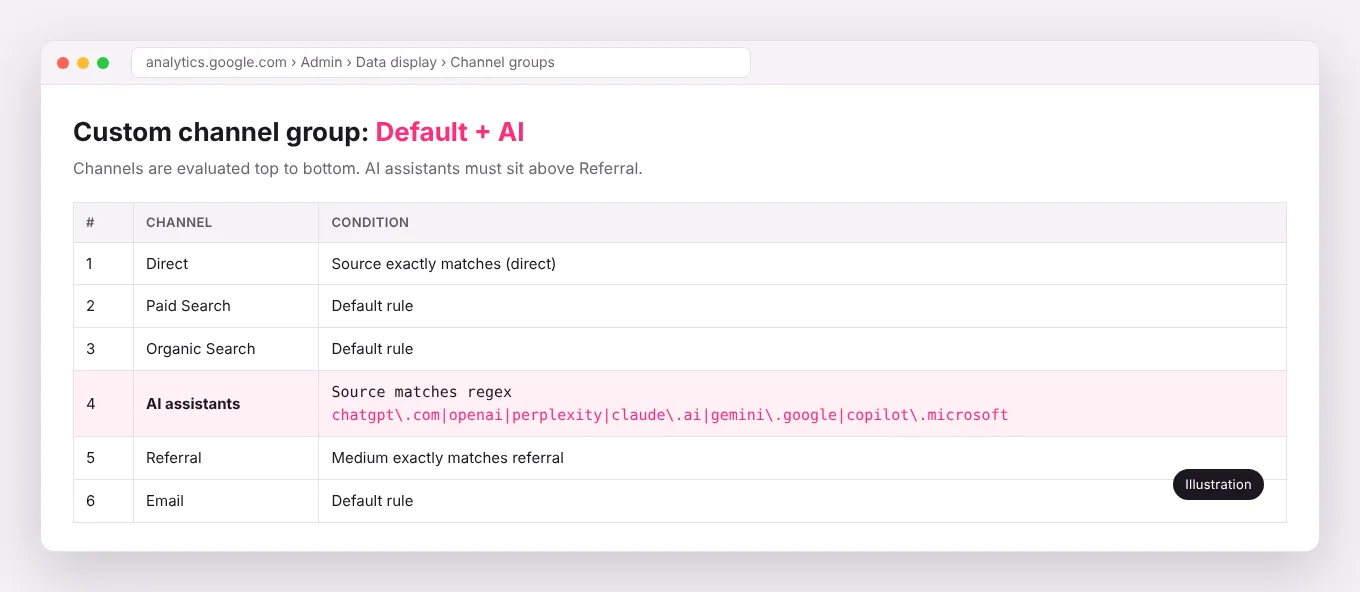
- Create a custom channel group that separates AI assistants, Local Services Ads and paid social.
- Set up consent mode if you serve visitors in regions that require consent.
- Build one simple report or Looker Studio dashboard the owner actually reads.
Frequently asked questions
Why does GA4 not match my CRM?
GA4 counts sessions and events in the browser and is affected by consent and ad blockers. Your CRM counts people and deals. Use GA4 for trends and channels, and the CRM for revenue.
Should I still use Universal Analytics data?
Universal Analytics stopped processing data in 2023. Export what you need for history and compare trends, not exact numbers.
Do I still need Google Tag Manager?
For most business sites, yes. GA4's enhanced measurement covers basics, but call clicks, form outcomes, consent mode and ad platform tags are far easier to manage in one container you control.
We restore and audit GA4 as part of our strategy and CRM work, then build the dashboard on top of it.