

A website redesign keeps its search traffic when every valuable old URL either stays the same or redirects to its closest new equivalent, the content that earned rankings is carried over, and tracking, structured data and internal links are verified on launch day. Most traffic drops after a redesign come from skipping one of those.
Before design starts
- Export every URL with traffic, links or conversions from Search Console, GA4 and a crawl.
- Mark which pages must survive and which can be merged or retired.
- Record current rankings, traffic and leads as a baseline.
- Save copies of structured data, titles and meta descriptions that work.
| Old page situation | What to do | Redirect |
|---|---|---|
| Same content, new URL | Point it to the new URL | 301 |
| Merged into another page | Point it to the page that now covers it | 301 |
| Removed, with a close match | Point it to the closest relevant page | 301 |
| Removed, no match, no links | Let it return 404 or 410 | None |
| Removed, but has backlinks | Rebuild it or redirect to the best match | 301 |
During the build
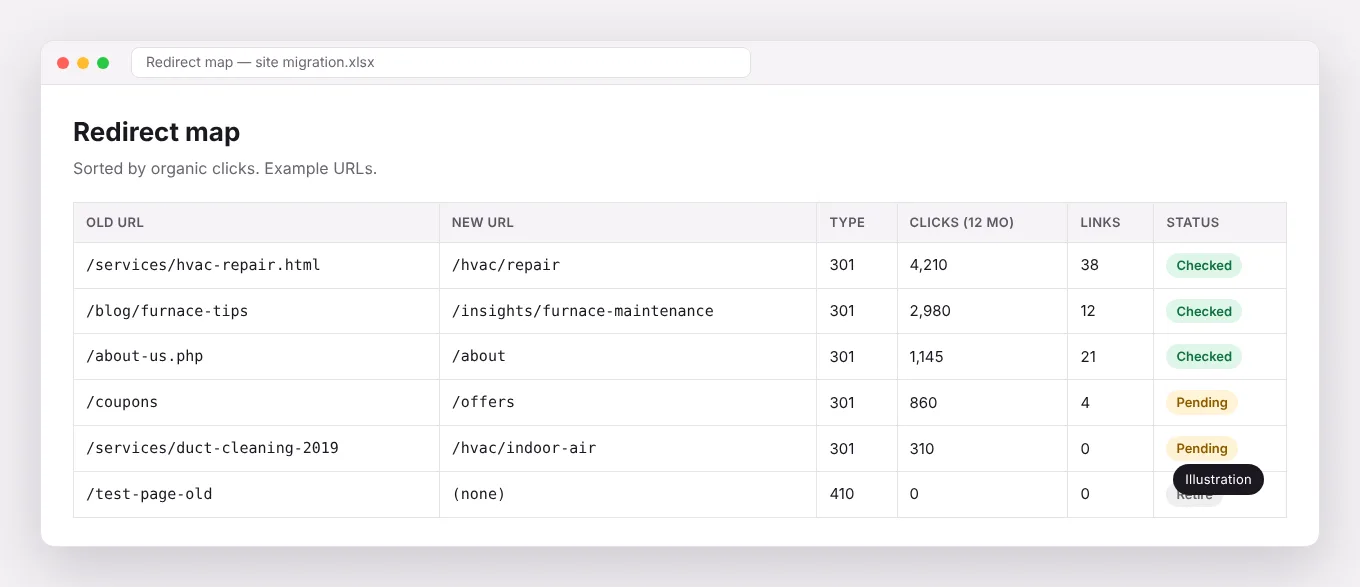
- Map every old URL to a new URL in a redirect sheet before launch.
- Keep the content that ranks; improve it rather than replace it with thinner copy.
- Plan internal links and navigation so important pages stay close to the home page.
- Build on a staging site blocked from indexing.
Launch day
- Implement 301 redirects and test a sample of them.
- Remove the noindex and staging blocks.
- Submit the new XML sitemap in Search Console.
- Check robots.txt, canonical tags and structured data.
- Verify every form, call button and GA4 key event.
The month after
- Watch Search Console for crawl errors and 404s daily for the first week.
- Compare rankings, traffic and leads to the baseline weekly.
- Fix broken internal links and redirect chains.
Our founder led a 12-week rebuild of two law firm sites with about 40 service pages reassigned by search intent, and a 700-plus-page Next.js rebuild that lifted PageSpeed from 34 to 98 and got more than 400 additional pages indexed, both in in-house roles.
Frequently asked questions
Will I lose rankings after a redesign?
A short dip is common while Google recrawls. A lasting loss usually means missing redirects or removed content.
Should I change my URLs?
Only if the new structure is clearly better. Every changed URL needs a redirect.
Should I change URLs during a redesign?
Only when the new structure is clearly better. Every changed URL is a redirect to maintain and a small risk. If the old URLs are readable and logical, keep them.
For platform choices, our sister studio Irmo Web Design publishes in-depth comparisons. We handle the marketing side of migrations: content, tracking and SEO continuity.